Snapchat Now Supports PlayCanvas Games

Big news for PlayCanvas developers: your games can now run inside Snapchat! 🎉 With Snapchat Web Lenses, you can build a game with PlayCanvas, upload it as a Lens and put it in front of a huge audience of Snapchatters who love to play.
In this post, we'll explain what Web Lenses are, show off four of the first PlayCanvas games on Snapchat and walk you through building and publishing your own.
What Are Web Lenses? 🤔
A Web Lens is a web app that runs inside Snapchat as a Lens. You build it with the web technologies you already know, zip up the build output and upload it through My Lenses. Snapchat publishes it like any other Lens, so for players, launching your game is as easy as trying a new Lens. And you never have to open Lens Studio.
Games are the first focus for Web Lenses, and mobile web games are a natural fit: they're designed for portrait touchscreens, load fast and stay small. Any web framework can be used, but Snap strongly recommends PlayCanvas as the most capable and best-optimized engine for Web Lenses, and the Web Lenses documentation uses PlayCanvas throughout.
- What it is: A web app, packaged as a zip and published as a Snapchat Lens
- Platforms: Snapchat for iOS and Android
- Display: Full-screen portrait (9:16)
- Engine: Any web framework, with PlayCanvas recommended by Snap
- Package size: A zip of up to 8 MB, with an
index.htmlof up to 1 MB at its root - Runtime: WebAssembly (including multi-threaded), Web Workers and
eval()are all supported - Sandbox: Self-contained, with no network, camera, microphone or motion sensor access
- Snapchat features: Leaderboards, Bitmoji and Storage, via the Web Lens API
- Status: Beta, so details may change
Why Web Lenses Are a Game Changer 🚀
Reach a Huge Audience That Loves to Play
Snapchat is used by 971 million people every month, and games are already a big part of how they spend their time: Snap reports that Game Lenses engage over 175 million people every month. Web Lenses open that audience up to web game developers for the first time.
There's no app to install and no store listing to fight for. Your game shows up wherever Lenses do, and players can find it by name or scan its Snapcode to jump straight into play. Built-in leaderboards then give them a reason to keep coming back to beat each other's scores. 🏆
Monetize Your Games With Lens+ 💰
Lens+ is Snapchat's subscription for fans who want exclusive Lenses. Through Lens+ Payouts, creators can mark a Lens as Exclusive to Lens+ and Platinum subscribers and earn a revenue share based on the engagement it receives. In other words, the more your game is played, the more you can earn.
Lens+ Payouts is open to creators aged 18+ in eligible countries, and a Lens is enrolled when you submit it. Check the eligibility requirements and apply before you publish!
Meet the First PlayCanvas Games on Snapchat 🎮
We've been working with some incredibly talented developers on the first wave of PlayCanvas-powered Web Lenses. Grab your phone and scan a Snapcode to play. Your regular camera app works too, and opens the game straight in Snapchat!
🌸 Bloom
Bloom is a cozy garden puzzler. Plant potted flowers on the board, match colors to make them bloom and keep your garden growing for as long as you can. When space gets tight, power-ups like shuffle and shears help you dig your way out. 🌷
"Bloom players spend an average of 260 seconds in the game, and almost 30% of them come back the next day. Most of our players are women, which shows how much room there is on Snapchat for cozy puzzle games."
— Yohami Zerpa
🏀 Ball Smasher
Ball Smasher is a fast-paced street-basketball shooter, currently dressed up in a spooky Halloween skin. Flick balls at hoops that slide across the street, chain baskets together for fiery streaks and beat the clock to post a score that tops the leaderboard. 🏀
"Ball Smasher was a breeze to build in PlayCanvas Editor. Our tiny team prototyped and tested it in Snapchat within hours. The hyper-casual gameplay hit millions of plays in days. We kept iterating with frequent content and balance updates, seeing results instantly in analytics. Growth stayed fully organic, and we're excited about the monetizing opportunities ahead."
— Maksims Mihejevs

🐍 Snake Showdown
Snake Showdown is a slithery battle for survival on a tropical island. Gobble orbs to grow, grab golden gems and outmaneuver your rivals (heads bounce, but bodies are deadly!) as you race up the rankings before the clock runs out. Keep an eye on the tide, too. 🌊
"We built Snake Showdown with PlayCanvas, and the first version went from code to live on Snapchat in a single day. In its first four weeks it passed 7 million plays from more than 1.8 million players, who shared it over 100,000 times. And we're just getting started."
— Leonidas Maliokas
🏂 Bitmoji Ski
Bitmoji Ski puts you on the slopes as your very own Bitmoji. Carve down the mountain, thread the flags for combos and launch off jumps for big air and 360s, all while trying not to bail into the trees! Every run counts toward the leaderboard. ❄️
"I made Bitmoji Ski to show the PlayCanvas community the kind of game that works well on Snapchat. It loads the player's own Bitmoji, and a leaderboard keeps them coming back for another run. It only took me a day to build, and it has hit 6 million impressions a day!"
— Iakov Sumygin

Create a Game in Minutes With Easy Lens 🪄
Got a game idea but don't want to write any code? Easy Lens is Snap's AI Lens creator, and its Web Lens games are powered by PlayCanvas. Describe your game in a prompt and Easy Lens plans it, writes the code and builds it for you in just a few minutes. Every follow-up message refines the same game, so you can keep tweaking until it plays just right. Test it in the browser preview or push it to your phone, then submit it to Snapchat when you're happy. Try it now!
Creating Web Lenses in Easy Lens is available to Lens+ subscribers on Easy Lens web. Easy Lens games already support leaderboards and saved progress, and Bitmoji support is on the way.
Build Your Own Game With PlayCanvas 🧰
Want full control over your game, plus every Web Lens API feature, including Bitmoji? Build it yourself with PlayCanvas. Here's how to go from idea to a published Web Lens in five steps.
1. Choose Your Workflow
There are two great ways to build with PlayCanvas, and both pair perfectly with AI.
Option A: PlayCanvas Engine + Your Favorite LLM
This is the way to go if you prefer to work entirely inside an LLM environment such as Claude Code, Codex or Cursor. A PlayCanvas Engine game is a regular JavaScript project, so your agent can read it, edit it, run it and check the results, while you describe what you want to build.
Scaffold a new project with create-playcanvas:
npm create playcanvas@latest
Or follow Snap's Build your first Web Lens guide, which sets up PlayCanvas and Vite from an empty folder.
Option B: PlayCanvas Editor + MCP Server
If you're coming from Unity or another visual editor, you'll feel right at home in the PlayCanvas Editor. You get a visual scene hierarchy, an asset pipeline and real-time collaboration, all in the browser. Add the Editor MCP Server and your AI assistant can work alongside you in the Editor, creating entities, writing scripts, wiring up assets and checking the result in the viewport.
Install the server once in your MCP client. For Claude Code, run:
claude mcp add playcanvas -- npx -y @playcanvas/editor-mcp-server
Then open your project in the Editor, select the MCP button at the bottom of the toolbar and hit Connect. The MCP Server docs cover setup for Codex, Cursor and Claude Desktop too.
2. Install the PlayCanvas Skills
PlayCanvas Skills teach your AI agent how to build polished PlayCanvas apps, covering app setup, model inspection, animation, scene assembly, game state, lighting, HUDs and effects. They work with Claude Code, Codex, Cursor and other Agent Skills clients. Projects created with create-playcanvas already include them. To add them to an existing project, run:
npx skills add playcanvas/skills
Start a new conversation afterward so your agent picks them up.
3. Build Your Game
Now for the fun part! 🕹️ Describe the game you want and let your agent help you build it. A good prompt states the platform constraints up front:
Build a portrait (9:16) one-thumb arcade game with the PlayCanvas Engine and
Vite, designed to run as a Snapchat Web Lens. Keep the HUD inside the safe
area, use relative asset paths and keep the zipped build under 8 MB.
Keep these Web Lens essentials in mind as you go:
- Design for portrait. Lenses run full screen at 9:16, and landscape isn't supported.
- Respect the safe area. Snapchat draws its own controls over your game, including a close button near the top. Keep your HUD inside
env(safe-area-inset-*)and test with a large simulated top inset. - Bundle everything. A Lens can't reach the network, so every script, model, texture and sound must ship inside your zip.
- Stay lean. Import Engine classes by name (rather than
import * as pc) so your bundler can drop what you don't use, compress your textures and skip source maps. - Handle the basics. Scale motion by elapsed time (many phones run at 120 Hz), start audio from a user gesture and pause when the Lens is hidden.
You can test your build on a real phone before publishing. Run npx vite preview --host and open the network URL in your phone's browser. Check out Snap's Runtime environment guide for more tips.
4. Integrate the Web Lens API
The Web Lens API connects your game to Snapchat. In an Engine project, install it from npm:
npm install @snap/web-lens-api
In the Editor, copy snap-api.js from the package into your project as a script asset and set its Loading Type to Before Engine. It installs the same API as window.snapchat. The API must ship inside your zip, so don't add it under Settings > External Scripts.
Call init() once at startup, then check that a capability is supported before you use it:
import snapchat from '@snap/web-lens-api';

await snapchat.init();

if (snapchat.isSupported('leaderboards')) {
    // Show your leaderboard button
}
Outside Snapchat (in your desktop browser, on a local dev server or on the Editor's Launch page), the API answers from a built-in stub with canned data, so you can develop without a phone. Always keep your game playable when a capability is missing.
Here are the three capabilities in the first release, and how each can make your game better.
🏆 Leaderboards
Nothing says "one more go" like a leaderboard! Leaderboards turn a solo game into a friendly competition and give players a reason to come back and reclaim the top spot. Submit a score at the end of each run and open Snapchat's own leaderboard panel to show where the player ranks:
async function onGameOver(score) {
    if (!snapchat.isSupported('leaderboards')) return;

    try {
        // Scores must be integers
        await snapchat.leaderboards.submitScore({ score: Math.round(score) });
        await snapchat.leaderboards.show();
    } catch (err) {
        // Never let a leaderboard failure end the fun
        console.warn('Leaderboard unavailable:', err.message);
    }
}
Higher scores rank first by default. For lower-is-better games like time trials, pass ordering: 'ascending' with every submission.
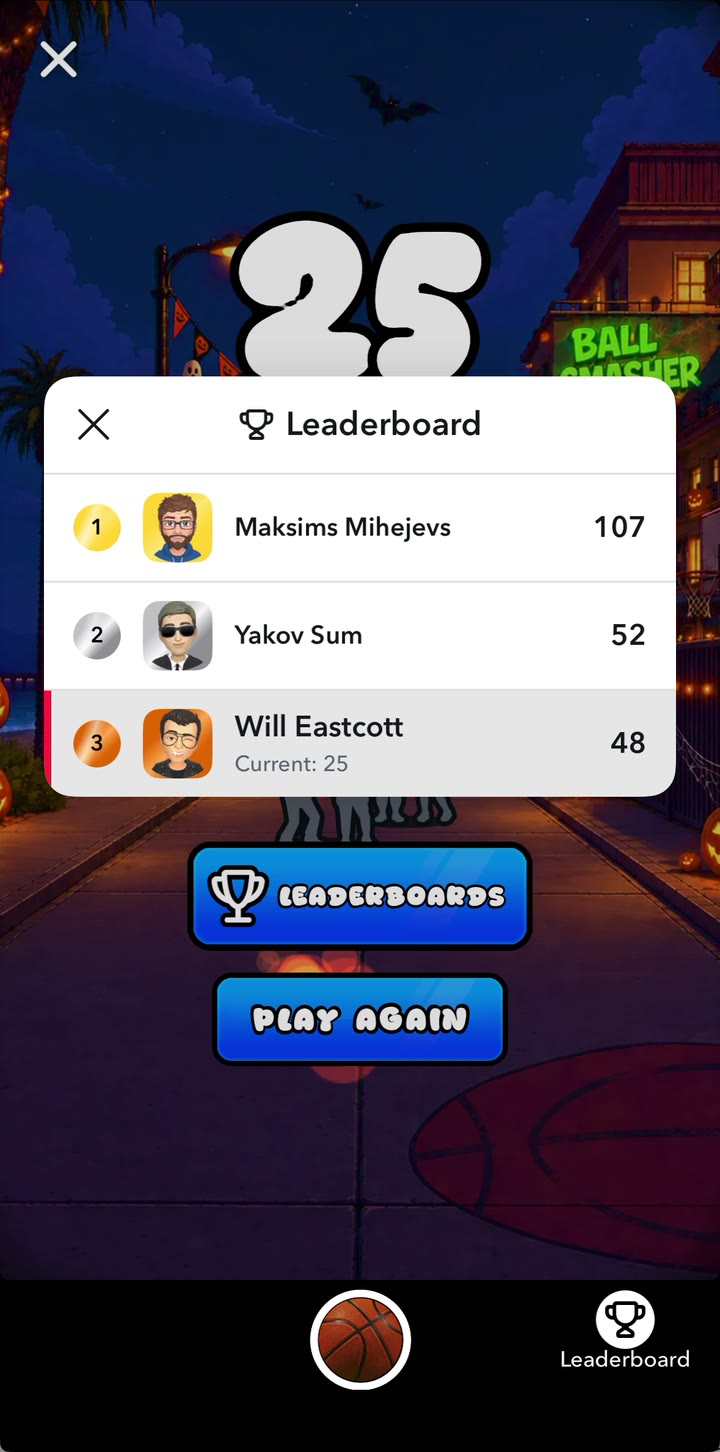
Snapchat's leaderboard panel in Ball Smasher
And the competition doesn't stop when the Lens closes. When a friend beats a player's score, Snapchat can send them a notification inviting them back to reclaim their spot, which is a powerful way to bring players back day after day. 🔔
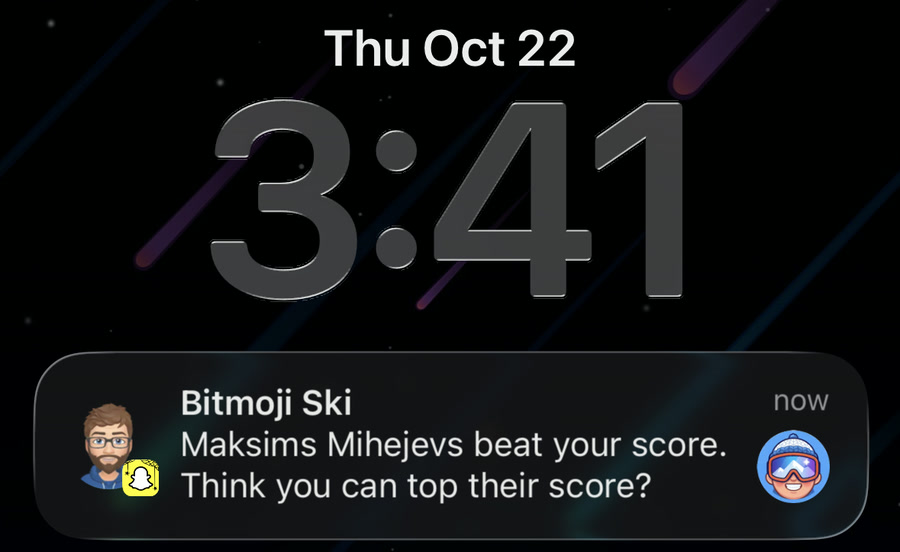
A leaderboard notification from Bitmoji Ski
😎 Bitmoji
Let players star in your game as themselves! The Bitmoji capability gives you the player's Bitmoji as a rigged 3D GLB model or as a head-and-shoulders 2D image. Use the 3D avatar as a playable character, and the 2D image for profile badges, scoreboards or dialogue portraits. In PlayCanvas, the 3D avatar loads as a container asset:
import { Asset } from 'playcanvas';

// Resolves to the player's Bitmoji, or null to use your bundled default character
async function loadBitmoji(app) {
    // The desktop stub returns an empty placeholder avatar, so skip it there
    if (!snapchat.isSupported('bitmoji') || snapchat.isStub) return null;

    const { hasAvatar } = await snapchat.bitmoji.getAvatarInfo();
    if (!hasAvatar) return null;

    // The URL expires after about five minutes, so load it right away
    const { url } = await snapchat.bitmoji.get3DAvatar();
    const asset = new Asset('bitmoji', 'container', { url });
    app.assets.add(asset);

    return new Promise((resolve, reject) => {
        asset.ready(() => resolve(asset.resource.instantiateRenderEntity()));
        asset.once('error', reject);
        app.assets.load(asset);
    });
}
Bitmoji avatars use Snap's own rig and ship without animations, so author your clips on the Bitmoji rig and play them with an anim component. Always bundle a default character too, for players without a Bitmoji and for when you're developing against the stub. Snap's Bitmoji guide has the details.
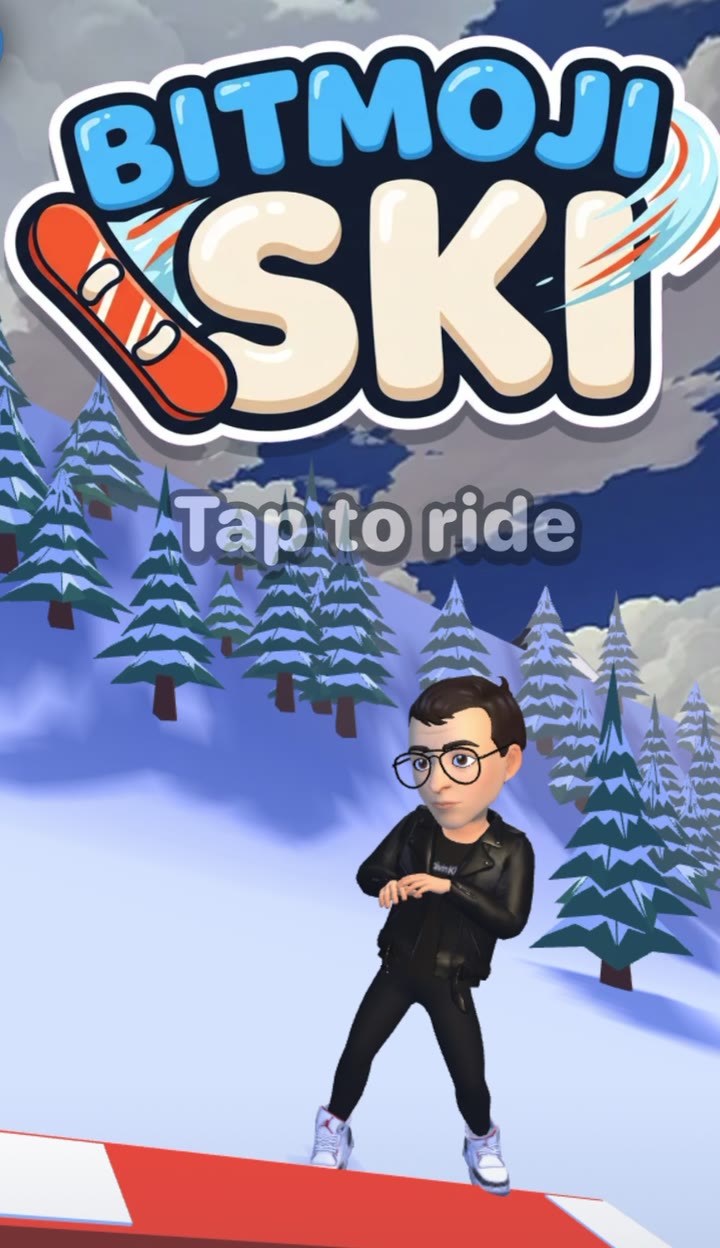
Bitmoji Ski puts the player's own Bitmoji on the slopes
💾 Storage
Here's a gotcha: inside a Lens, localStorage and IndexedDB start empty every time the Lens opens. To keep progress between sessions, use the Storage capability, a small key-value store tied to the player's Snapchat account. That's perfect for unlocks, levels, best scores, settings and daily streaks, the kinds of things that turn a one-off play into a habit.
async function loadProgress() {
    if (!snapchat.isSupported('storage')) return null;

    const result = await snapchat.storage.get('progress');
    return result.found ? result.value : null;
}

async function saveProgress(progress) {
    if (!snapchat.isSupported('storage')) return;

    await snapchat.storage.set('progress', progress);
}
Each value can be any JSON up to 32 KiB, with 100 KiB in total per Lens per player. Wait for your first read before writing, save whenever progress changes and when the page is hidden (players can swipe a Lens closed at any moment), and keep just one write in flight at a time.
5. Publish to Snapchat
Once your game is ready, it's time to ship it! 🚢
- Build your game. Run
npm run buildfor an Engine project, or download a build from the Editor's Publish dialog. - Zip the build. Zip the contents of your build folder so
index.htmlsits at the root, not the folder itself. On Windows, avoid PowerShell'sCompress-Archive, which writes backslashes that break relative paths. Check the result withunzip -land confirm it's under 8 MB. - Upload it. Sign in to My Lenses, create a new Lens, choose the Web Lens option and upload your zip.
- Add your Lens details. Give your game a name, a 512 × 512 PNG icon and a 5-second, 720 × 1280 preview video showing its most exciting moment.
- Submit for review. Once approved, your game is live in Snapchat for players to find by name or Snapcode!
Snap's Platform requirements and Publishing guides have the full checklist and asset specs.
Get Funded to Build Your Web Lens 💸
Got an idea for a great Web Lens game? Snap wants to hear it! Snap is inviting developers to pitch original games and request a budget for their development, and selected pitches get funded. Tell Snap how your game plays, why it's a great fit for Snapchat, roughly how long it will take to build and how much budget you need. If you have a prototype, video or deck, share that too.
Snap is prioritizing games with a strong social loop, so a Web Lens built around leaderboards is a great place to start. 🏆
There's no fixed deadline, but this offer won't last forever. If you've got an idea, send in your pitch soon. ⏰
Join the Community 💬
We can't wait to see what you build! Here's how to connect with us and other Web Lens developers:
- Join the PlayCanvas Discord and head to the #snapchat-web-lenses channel to ask questions, share progress and get feedback.
- Show off your game! When you share your Web Lens on social media, tag PlayCanvas on X and LinkedIn and we'll help amplify it to the community.
Happy building, and see you on Snapchat! 👻