Turning a Gaussian Splat Into a Videogame

Gaussian Splatting gives you photorealistic environments for free. The catch: a splat is just a cloud of oriented blobs - no triangles, no colliders, no navmesh, no lights. Drop a character in and they'll float through walls looking like they belong in a different universe.
This post walks through the demo I built to fix all of that:
- 👉 Play it in your browser - WASD, mouse to aim, left-click to fire.
- 👉 Check the project - the full PlayCanvas project is public. Every script mentioned in this post lives inside it, ready to read, fork, or remix.
The scene is a gorgeous indoor scan of a real abandoned place by Christoph Schindelar. Christoph is one of the best artists working with Gaussian Splats out there, so when he proposed to scan a real place for me, I jumped at the opportunity. On top of that splat I bolted a physics collider, a grid of baked lighting probes, a Recast navmesh, eight personality-driven NPCs and a classic FPS loop. Everything runs in a browser tab.
🏗️ The Build
Here's how I built it, step by step.
📥 Step 1: Download a Splat from SuperSplat
Before any code, you need a scene. Any splat on SuperSplat tagged Downloadable has been published under Creative Commons by its author - grab the .ply or .sog and drop it straight into your own PlayCanvas project. The lighting, clutter and scale of the scan I picked were already cinematic, so I didn't have to art-direct anything.
Jump straight to the pre-filtered downloadable view and pick one.
📡 Step 2: Convert the Splat to Streamed SOG Format
The Swiss Army knife for everything that follows is splat-transform - PlayCanvas's open-source CLI for converting splats. We'll lean on it for streamed LOD here and for a collision mesh in the next step.
My scene is a few million Gaussians - big enough that shipping it as a single .sog asset would punish anyone on a phone or a slow connection. The fix is Streamed LOD: instead of one monolithic file, splat-transform writes out a folder of SOG chunks plus a lod-meta.json manifest. The runtime loads chunks on demand based on the camera's viewpoint and the device's capability - high-end desktop pulls full detail around the player, a phone pulls a lighter subset, and neither of them stalls waiting for the whole file.
Scripts/streaming-lod.mjs hooks into the camera and asks the runtime to keep the chunks around the player fully loaded before the game starts - so you never see pop-in mid-firefight.
If your splat is over a few million Gaussians, bundle it into streamed LOD with splat-transform - write out your detail levels, then combine them into a lod-meta.json (the Generating Streamed SOG guide walks through both steps) - and let the viewer stream it. Your mobile players will thank you.
npm install -g @playcanvas/splat-transform
🧱 Step 3: Generate a Collision Mesh
This used to be the hard part. A splat has no surfaces, so physics is blind to it. You can't walk on it, shoot through it, or path around it. That's where splat-transform earns its keep again - the flag you want is --collision-mesh. Aim the output at a .voxel.json file and it voxelizes the splat, seals the shell, flood-fills the navigable interior from a seed position, and writes out a .collision.glb that you can import straight into PlayCanvas as a mesh collider.
splat-transform scene.ply \
  --seed-pos 0,1,0 \
  --voxel-size 0.05 \
  --voxel-opacity 0.1 \
  --voxel-external-fill \
  --voxel-carve 1.6,0.2 \
  --collision-mesh \
  scene.voxel.json
That's a separate run from the SOG conversion in Step 2 - splat-transform writes one output file per invocation, and the collision mesh only comes out of a .voxel.json output. It gives me:
scene.voxel.json+scene.voxel.bin- a sparse voxel octree of the scene, handy for raycasts.scene.collision.glb- a voxel-derived mesh that hugs the real geometry.
Two knobs worth knowing: --voxel-external-fill is the one for interior scans like mine (use --voxel-floor-fill for outdoor scenes instead), and --collision-mesh defaults to a smoothed marching-cubes mesh - pass --collision-mesh faces if you'd rather have a watertight mesh that matches the voxel volume exactly. The Collision Mesh Generation guide walks through every stage and stays current with the CLI.
I dropped the GLB into the PlayCanvas project and attached it to an invisible entity with a Collision component (mesh) and a Rigid Body component (static). Suddenly the player has a floor, the bullets can collide with walls, and the NPCs have something to walk on. No modeling, no clean-up.
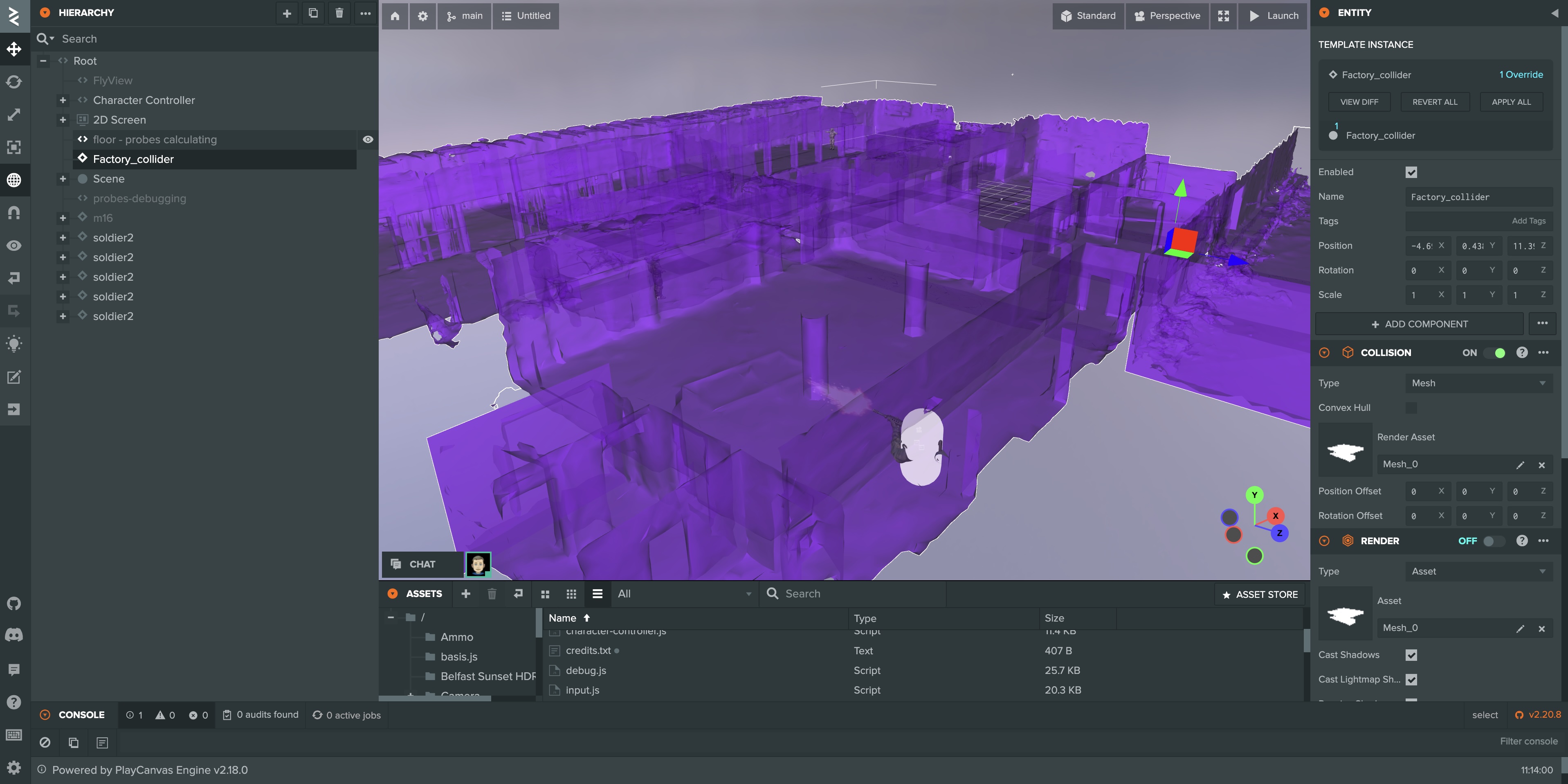
One command turns a pretty splat into a playable one - run splat-transform scene.ply --collision-mesh scene.voxel.json and drop the resulting .collision.glb into your project as a static mesh rigidbody.
💡 Step 4: Bake a Lightness Grid from the Splat
Splats carry their lighting baked into every Gaussian. That means the scene looks amazing and unchanging. But my player's weapon model, the NPC soldiers and the pickups are ordinary lit PBR meshes - they'd stand out like cardboard cutouts under gym lighting unless they somehow inherited the splat's lighting.
I didn't want to re-light the splat. I wanted a cheap way to ask "how bright is it here?" at any point in the map, at runtime, for my regular meshes.
How Scripts/probes.js works:
-
Grab the AABB of a designated floor entity and build a 1-metre grid of probe positions 1 metre above the ground.
-
Create a tiny 16×16 offscreen
RenderTargetand a 90° FOV camera that renders only theWorldlayer (i.e. the splat - no characters, no HUD, no viewmodel). -
For each probe, render 6 faces of a cube (+X, -X, +Y, -Y, +Z, -Z),
readPixelsthe 16×16 RGBA output, and compute luminance using the standard Rec. 601 weights:this._faceLuminance += 0.299 * r + 0.587 * g + 0.114 * b;// ... after all 6 faces:var lightness = this._faceLuminance / 1536; // 6 faces * 256 pixels -
Stash the value in a
gridDepth × gridWidth2D array and spawn a tiny debug sphere at the probe position withemissive = lightnessso you can see the light field floating in the scene. -
When all probes are done,
console.log(JSON.stringify(this.probeJSON)). I copy that out once, save it aslightness.json, attach it as a JSON asset, and delete the probes entity.
Here's the bake in action - each debug sphere pops in as its cube of faces is rendered and its luminance is averaged. Bright spheres mark a well-lit spot on the floor; dim ones sit in corners and under cover. By the end you can read the scene's lighting as a dotted heatmap before a single byte of JSON is written.
At runtime, every dynamic character script (weapon, NPC, pickup) loads lightness.json, bilinearly samples the grid at its world position, remaps it to a sensible exposure range and calls meshInstance.setParameter('exposure', value). Step from a bright atrium into a dim corridor and your hands darken smoothly. Fire your weapon and the pulsating omni-light bounces off the splat around you.
─── Probes: baking 392 probes (28 x 14) ───
Probe 1/392   lightness: 0.4821
Probe 2/392   lightness: 0.4733
...
The whole bake takes ~15 seconds once, then the JSON is ~40 KB. No expensive runtime probes, no deferred relighting, just a lookup table.
🛠️ Step 5: Vibe Code with the PlayCanvas VS Code Extension
I didn't write any of this in the PlayCanvas web editor's code panel. I used the PlayCanvas extension for VS Code - which also works inside Cursor, so I could pair-program with Claude while editing.
Save the file → the editor picks up the change → reload the launch tab → test. That round-trip is measured in seconds.
Most of the gameplay logic in this demo - character-controller.js, anim-states.js, npc-ai.js, probes.js - was iterated on entirely from Cursor.
Install the PlayCanvas VS Code extension. If you live in VS Code or Cursor, it turns PlayCanvas into a normal dev environment.
🔄 Step 6: Version Your Project with PlayCanvas + GitHub
"What did I change yesterday, and how do I roll back?" PlayCanvas ships a first-party version control that answers exactly that. You can also use GitHub at the root of your locally synced PlayCanvas project (via the VS Code extension). Don't forget to add a .pcignore so the .git folder isn't synced to the cloud.
Combined with the VS Code extension, this is about as close to "I'm working in a normal repo" as I've ever had in a browser-first engine. If I break the NPC AI, I'm one git revert away from last night's working build.
Link a GitHub repo to your PlayCanvas project before you start. You'll thank yourself the first time an AI coding agent commits a bad refactor at 1 AM.
🧭 Step 7: Generate a Navmesh from the Collision Mesh
NPCs can't path on a splat either - they need a navmesh. For the runtime, I use recast-navigation, loaded straight from esm.sh with dynamic import - zero bundler, just:
const recast = await import('https://esm.sh/recast-navigation');
await recast.init();
const imported = recast.importNavMesh(new Uint8Array(navmeshBuffer));
To produce the navmesh.bin binary, I feed the same scene.collision.glb from Step 3 into a small offline Recast-based generator. The collision mesh already represents "solid floor you can walk on", so Recast just has to rasterize it, filter walkable spans and build the nav polygons - takes a few seconds.
I'm cleaning up the generator into a standalone library and will publish it on GitHub shortly - drop-in collision-GLB-to-navmesh-binary for any PlayCanvas project. Follow my X account if you want the drop.
Want to see the navmesh in-game? Press N in the demo to toggle the debug overlay - the walkable polygons, agent positions and current paths all light up on top of the splat.
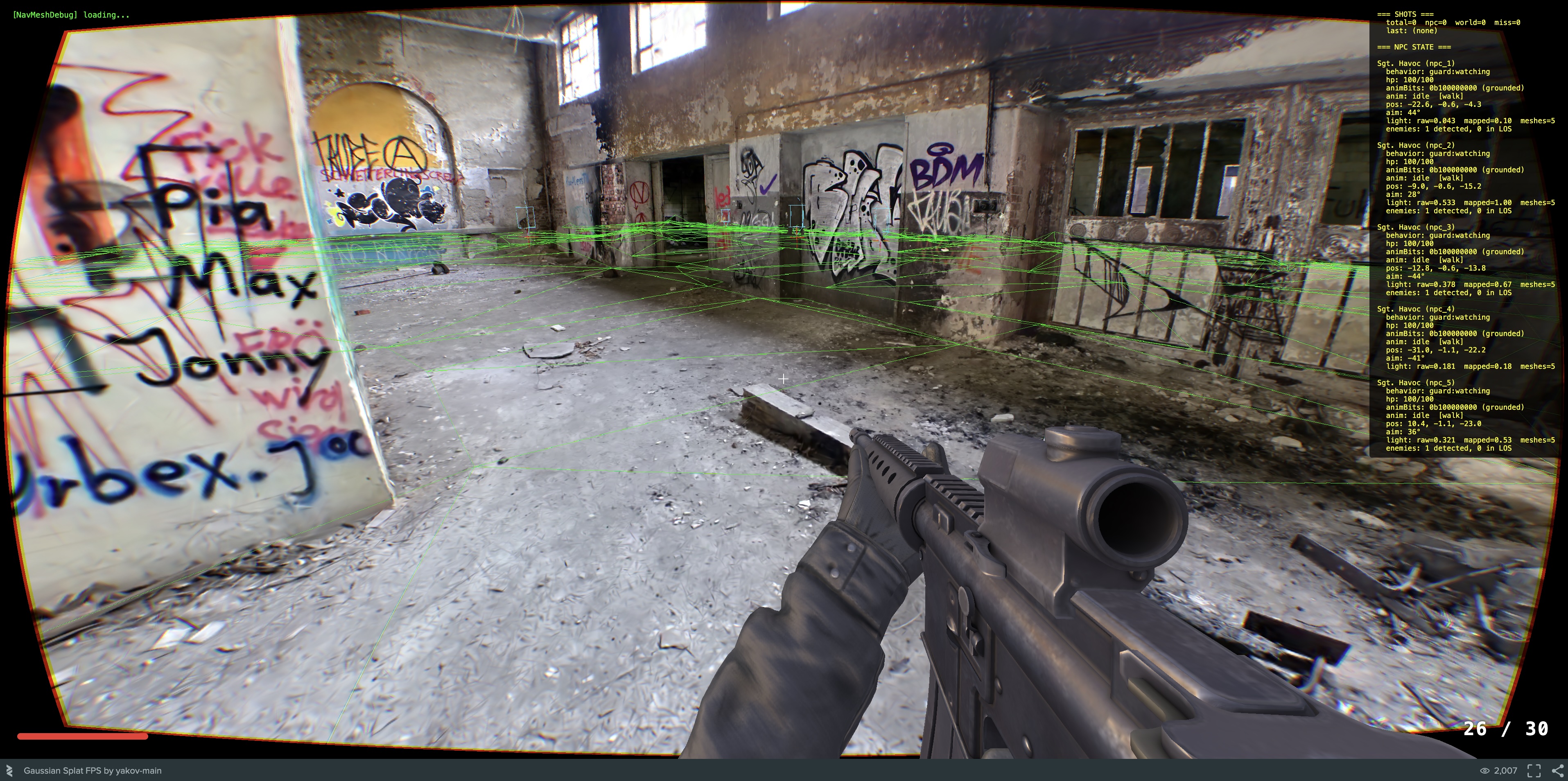
Once the library is live, it'll be a one-liner:
npx glb-to-navmesh scene.collision.glb navmesh.bin
🧠 Step 8: Give NPCs a Brain with Behavior Trees and Personalities
The NPCs are the part I had the most fun with. Every soldier in the demo is driven by a classic behavior tree - the same abstraction Halo 2 popularized two decades ago and that's still the default for AAA AI in 2026.
Scripts/npc-ai.js exposes four primitives:
sequence(...children)   // all must succeed
selector(...children)   // first non-failure wins
condition(pred)         // leaf: true/false
action(fn)              // leaf: 'success' | 'failure' | 'running'
…and then every NPC's brain is built by composing those, parameterised by a personality:
return selector(
    sequence(isDead, autoRespawn),
    sequence(
        isAlive,
        selector(
            sequence(isReloading, stopShooting),
            sequence(ammoEmpty, doReload),
            ...(traits.healPriority > 0.4   ? [sequence(hpBelow(hpRetreatPct), hasPickupsNearby, goToPickup)] : []),
            ...(traits.lootPriority > 0.7   ? [sequence(hasPickupsNearby, goToPickup)] : []),
            ...(traits.retreatThreshold > 0.3 ? [sequence(hpBelow(hpRetreatPct), retreat)] : []),
            ...(traits.aggression > 0.2     ? [sequence(hasEnemiesInRange(attackRange), engageEnemy)] : []),
            guard
        )
    )
);
Spawn eight NPCs with eight different personalities - Sgt. Havoc (aggressive, pushes), Ghost (cautious, heals), Captain Valor (heroic), Strategist (tactical), Chaos (randomness 0.8, impossible to read), Loot Goblin (greedy, will run across the map for a pickup), Chicken (cowardly, retreats at 80% HP), Grumps (grumpy) - and they already feel distinct, because the same tree collapses to wildly different priority orders based on traits.
Each agent's position, aimAngle, animBits is updated every tick. The PlayCanvas side - npc-controller.js - is just a dumb bridge that reads those fields, sets the entity transform, picks an anim state, fires a muzzle-flash ray, triggers sounds. The AI itself has zero PlayCanvas dependencies except pc.Vec3; it could be lifted into Three.js, Babylon, a headless sim, whatever.
If you've been nervous about behavior trees, read Chris Simpson's primer and then copy my four-function implementation. It's 20 lines of code and it unlocks production-grade AI.
🎮 What You Need to Build One of These
To recap the full stack:
- 📥 Environment - any downloadable splat from SuperSplat, or your own capture.
- 📡 Streaming - convert with
splat-transformto a streamed SOG folder so phones and slow connections don't stall. - 🧱 Collider -
splat-transform --collision-mesh→.collision.glb, dropped into PlayCanvas as a static mesh rigidbody. - 💡 Lighting - bake a
lightness.jsongrid withprobes.js, sample it per-mesh-instance at runtime. - 🛠️ Authoring - PlayCanvas VS Code extension for a normal save-and-reload dev loop.
- 🔄 Versioning - PlayCanvas version control and/or GitHub via the VS Code extension.
- 🧭 Pathfinding - recast-navigation from
esm.sh, fed a pre-bakednavmesh.bin(generator library coming soon). - 🧠 AI - behavior trees + personality-driven traits.
Every one of those pieces is free and open source. The whole thing ships as static files to a CDN. My build is 68 MB (splats environment streamed separately from AWS S3) and cold-loads in a few seconds.
💚 Free and Open Source
SuperSplat, splat-transform, recast-navigation and the PlayCanvas Engine are all open source. And so is this demo - the whole PlayCanvas project is public. Sign up for a free PlayCanvas account, fork the project, and every script mentioned above (probes.js, npc-ai.js, npc-controller.js, the navmesh wrapper, and the rest) is yours to read or remix. If you take them somewhere cool, I want to see it.
👂 Try It, Break It, Tell Me
Play the demo. Stand in a bright room and watch an NPC walk into the shadow. Fire your weapon next to a wall and watch the splat flash. Crouch into a corner and notice the footsteps go quiet.
Then go build your own. If you have questions, find me and the rest of the splat-creator community on the PlayCanvas Discord - that's where all the interesting splats-into-games conversations are happening right now.
See you in there.